Capturing the distant world through the powerful magnification of a spotting scope offers an unparalleled perspective. Whether you’re an avid birdwatcher, a dedicated hunter, or an astronomy enthusiast, pairing your camera with a spotting scope, a technique known as digiscoping, allows you to document and share these incredible sights. This guide will walk you through the essential methods, from quick DIY solutions for smartphones to effective setups for DSLRs and mirrorless cameras, ensuring you can attach your camera fast and start capturing breathtaking telephoto images with ease. Get ready to transform your spotting scope into a formidable super-telephoto lens and unlock new photographic possibilities.
Understanding Digiscoping: The Art of Connecting Your Camera
Digiscoping is the fascinating process of attaching a digital camera to the eyepiece of an optical instrument, typically a spotting scope, to capture magnified images of distant subjects. Unlike a standard camera lens, a spotting scope is designed for visual observation, offering immense magnification often far exceeding what a conventional telephoto camera lens can provide. When combined with a camera, the spotting scope effectively acts as a super-telephoto prime lens, allowing photographers to capture intricate details of wildlife, celestial bodies, or distant landscapes that would otherwise be impossible to photograph.
The primary components involved in a digiscoping setup include the spotting scope itself, a camera (smartphone, DSLR, or mirrorless), and an adapter to create a secure, aligned connection between the two. Understanding these elements is key to achieving clear, well-composed photographs. While the optical quality of your spotting scope dictates much of the image potential, the method of attachment and camera settings play crucial roles in translating that visual clarity into a captivating photograph.
Essential Gear for Attaching a Camera to a Spotting Scope
To successfully connect your camera to a spotting scope, you’ll need a few key pieces of equipment. The specific items will vary slightly depending on whether you’re using a smartphone or a more advanced DSLR/mirrorless camera. However, some fundamentals remain constant for achieving stable, high-quality results.
For DSLR or Mirrorless Cameras, the core setup involves:
- T-Ring: This is a camera-specific adapter that screws onto your camera body, replacing the lens. T-rings are available for all major camera mounts (e.g., Canon EF, Nikon F, Sony E).
- Spotting Scope T2 Adapter: This adapter connects directly to your spotting scope’s eyepiece (or sometimes replaces it entirely) and has a standard T2 thread (M42x0.75mm) to which your T-ring attaches. These adapters are often brand-specific to the spotting scope or designed to fit a range of eyepiece diameters.
- Tripod: Absolutely critical for stability. Given the extreme magnification, even the slightest movement can result in blurry images. A robust, stable tripod with a smooth pan/tilt head is essential.
For Smartphones, the setup is generally simpler:
- Smartphone Digiscoping Adapter: These adapters clamp onto your spotting scope’s eyepiece and securely hold your smartphone, aligning its camera lens with the scope’s eyepiece. They come in various designs, from universal clamps to magnetic systems or dedicated phone case mounts.
- Smartphone: Modern smartphones with good camera quality are surprisingly capable for digiscoping.
- Tripod: While some handheld shots are possible in bright conditions, a tripod significantly improves image quality and ease of use, preventing shake and making fine adjustments easier.
Regardless of your camera choice, a sturdy tripod is the undisputed backbone of any successful digiscoping setup. It minimizes vibrations and allows for precise framing and focusing, which are vital at high magnifications.
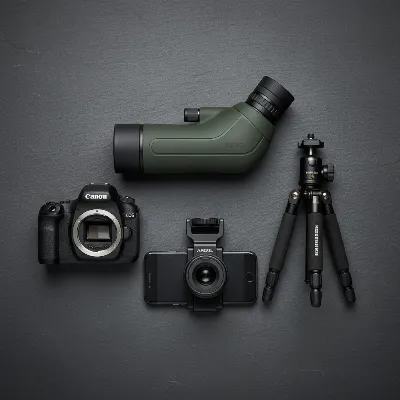 Essential gear for digiscoping: spotting scope, camera, T-ring, and various adapters.
Simple Methods to Connect Your Camera
Connecting your camera to a spotting scope can be done through a few distinct methods, each offering different levels of convenience and compatibility. The “fast DIY” approach often leans towards smartphone solutions due to their inherent simplicity and ubiquity.
1. Smartphone Digiscoping with Universal Adapters
|
Our Picks for the Best Spotting Scope in 2026
As an Amazon Associate I earn from qualifying purchases.
|
||
| Num | Product | Action |
|---|---|---|
| 1 | Gosky Flagship 25-75x80 Spotting Scope - Spotting Scopes with Tripod, Carrying Bag and Quick Phone Holder BAK4 Waterproof Spotter Scope for Bird Watching Target Shooting,Upgraded Version |

|
| 2 | SVBONY SV28 Spotting Scopes with Tripod, Angled 25-75x70mm Spotter Scope with Phone Adapter, Waterproof Fogproof Spotting Scope for Bird Watching, Target Shooting, Wildlife Viewing |
|
| 3 | SVBONY SV28 100mm Angled Spotting Scope for Target Shooting, 25-75x Spotter Scope with Tripod for Long Range Viewing, FMC HD Optics with Soft Carrying Case & Phone Adapter, Scopes for Birdwatching |
|
| 4 | 25-75x70 HD Spotting Scope with BAK4 Prism FMC Lens, IPX7 Floating Fully Waterproof Spotting Scopes for Target Shooting Birding Wildlife Viewing Stargazing, Tripod Phone Adapter Carrying Bag(Green) |
|
| 5 | 25-75X60 Spotting Scope with 51in Tripod, Spotting Scope for Target Shooting, Hunting & Bird Watching, Low Light Vision, Phone Adapter, Carry Bag, BAK4 Prism, FMC Lens, Waterproof (ArmyGreen) |
|
| 6 | SVBONY SV28 Plus Spotting Scopes with Tripod, Angled Spotter Scope with Upgraded Phone Adapter, IP65 Waterproof Fogproof Long Range Spotting Scope for Target Shooting, Birding |
|
| 7 | SVBONY SV28 20-60x80 New Version Spotting Scope for Target Shooting, Long Range Spotter Scope with Phone Adapter and Tripod, HD Scope for Bird Watching, Wildlife Observation |
|
| 8 | Gosky Flagship DiamondEdge 20-60x80 Spotting Scope with Tripod, Carrying Bag and Quick Phone Holder - BAK4 High Definition Waterproof Spotter Scope for Bird Watching Wildlife observing,Green |
|
| 9 | Spotting Scope 20-60x60mm - Waterproof IPX7 Spotter Scope with Phone Adapter and Tripod, Portable for Bird Watching Wildlife observing and Hiking, Black |
|
| 10 | High-Definition Spotting Scope for Bird Watching,Wildlife Viewing,Beginners Telescope,Target Observation.25-75×60mm HD Spotting Scope with Tripod and Phone Adapter,Monocular |
|
This is often the quickest and most versatile way to get started. Universal smartphone adapters typically feature a clamp mechanism that attaches to the spotting scope’s eyepiece, with a separate adjustable clamp or tray to hold your smartphone. You simply slide your phone into the holder and adjust it until your phone’s camera lens is perfectly centered over the scope’s eyepiece.
Fast DIY Tip for Smartphones: For a truly fast and inexpensive DIY solution, consider a method some enthusiasts use: obtain a rifle scope lens cover that fits snugly over your spotting scope’s eyepiece. Then, purchase a cheap, basic phone case for your specific smartphone model. Carefully align the phone’s camera lens with the center of the scope lens cover when the phone is in its case. Using strong adhesive, glue the scope cover directly onto the phone case, ensuring the alignment is precise. Once dry, you can simply slip your phone into this custom case and then slide the attached cover onto your spotting scope’s eyepiece for a quick, custom fit. This can cost as little as $10-15 and offers a surprisingly stable connection for rapid setup.
2. DSLR/Mirrorless Camera with Eyepiece Adapters
For more advanced cameras, the process involves a specific adapter system. First, you attach a camera-specific T-ring to your DSLR or mirrorless camera body. This T-ring then connects to a spotting scope adapter. This adapter is designed to fit over or replace the spotting scope’s eyepiece, creating a rigid connection between the camera and the scope. Many spotting scope manufacturers offer proprietary adapters, but universal versions that clamp onto a range of eyepiece diameters are also available. This method provides the most control over image quality and camera settings.
3. Direct Body Connection (Eyepiece Removal)
Some high-end spotting scopes allow you to remove their standard eyepiece and attach a dedicated camera adapter directly to the scope body. This method bypasses the eyepiece optics, potentially offering a cleaner image with less vignetting. However, these adapters are typically brand-specific and not considered a “DIY” solution, as they require specialized components designed for that particular scope model. It often yields the best optical results but sacrifices the ability to quickly switch between visual observation and photography.
Step-by-Step DIY Guide for Fast Smartphone Attachment
For a quick and effective way to use your smartphone for digiscoping, follow these steps. This guide focuses on universal smartphone adapters, which are widely available and offer a great balance of speed and functionality.
What you’ll need:
- A spotting scope mounted on a sturdy tripod
- Your smartphone
- A universal smartphone digiscoping adapter
- A remote shutter release (optional, but highly recommended)
The Process:
- Mount Your Spotting Scope Securely: Begin by setting up your spotting scope on a stable tripod. Ensure the tripod legs are fully extended and locked, and the scope is level. Any wobble will be greatly magnified in your photos.
- Attach the Smartphone Adapter to the Eyepiece: Take your universal smartphone adapter and carefully slide or clamp it onto the eyepiece of your spotting scope. Most adapters have a tightening mechanism (screws or a collar) to secure it firmly. Ensure it’s tight enough not to slip, but avoid overtightening.
- Position Your Smartphone: Place your smartphone into the adapter’s holder. Many adapters have adjustable clamps or a spring-loaded mechanism. Position your phone so that its main camera lens is roughly centered over the spotting scope’s eyepiece.
- Achieve Perfect Alignment: This is the most crucial step for clear images.
- Turn on your smartphone’s camera.
- Look at your phone screen. You should see a circular image from the spotting scope.
- Gently adjust the phone’s position within the adapter (up, down, left, right, and forward/backward) until the circular image is perfectly centered on your screen and fills as much of the frame as possible without showing dark edges (vignetting). Some adapters allow for fine-tuning this distance.
- If you see a lot of vignetting, try adjusting the distance between your phone camera and the eyepiece. Sometimes zooming in slightly on your phone’s camera can help eliminate the dark edges.
- Focus the Spotting Scope: Use the focusing knob on your spotting scope to bring your distant target into sharp focus on your phone screen. It’s often best to focus visually through the scope first, then make minor adjustments while looking at the phone screen.
- Adjust Camera Settings (Smartphone):
- Exposure: Tap on the brightest part of your subject on your phone screen to set exposure. You might need to manually adjust exposure compensation if your phone camera allows.
- Zoom: Use your phone’s digital zoom sparingly, as it degrades image quality. Physical alignment is always better than digital cropping.
- Stability: Use a self-timer (2-3 seconds) or a remote shutter release to trigger the camera without touching the phone, eliminating shake.
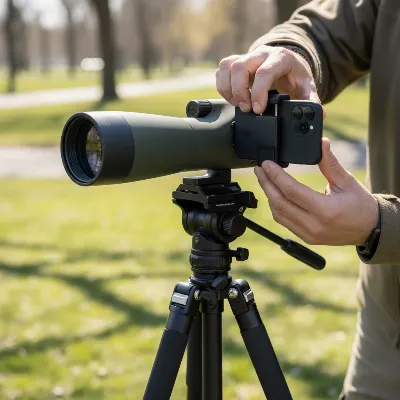 A person attaching a smartphone to a spotting scope eyepiece using a universal adapter on a tripod.
Tips for Best Results and Troubleshooting
Achieving crisp, stunning images through digiscoping requires more than just a proper attachment. Here are some essential tips to maximize your success and troubleshoot common issues.
- Stability is Paramount: As mentioned, a rock-solid tripod is your best friend. Consider adding weight to your tripod’s center column for extra stability, especially on windy days. A remote shutter release or self-timer is crucial to eliminate camera shake from pressing the shutter button.
- Optimal Focusing: Always start by focusing the spotting scope itself, aiming for the sharpest possible image through the eyepiece. Once the adapter and camera are attached, make only minor, gentle adjustments to the scope’s focus knob while observing your camera screen. For DSLRs/mirrorless cameras, use Live View and zoom in on the display to pinpoint focus.
- Mastering Exposure: Spotting scopes have a fixed aperture (the effective aperture is often high, like f/8 to f/16), meaning they don’t gather as much light as a fast telephoto lens. This necessitates adjustments on your camera:
- ISO: Be prepared to increase your ISO, especially in lower light conditions, to achieve a fast enough shutter speed. Modern cameras handle higher ISOs better.
- Shutter Speed: Aim for the fastest possible shutter speed to freeze motion and minimize shake.
- Manual Mode (DSLR/Mirrorless): Shooting in manual mode gives you complete control over ISO and shutter speed.
- Combating Vignetting: This is the dark circular edge you sometimes see around your image. It occurs when the camera lens isn’t perfectly aligned or is too far from the eyepiece.
- Adjust the camera’s position within the adapter for optimal centering.
- If your smartphone allows, a slight digital zoom (1.1x to 1.5x) can often crop out the vignetting without significant quality loss.
- Atmospheric Conditions: Heat haze and mirage can severely degrade image quality, especially over long distances. Early mornings or late evenings often provide the calmest air.
- Clean Optics: Keep both your spotting scope eyepiece and camera lens meticulously clean. Dust, smudges, or fingerprints will significantly impact image clarity. Use appropriate lens cleaning tools.
- Practice and Patience: Digiscoping has a learning curve. Experiment with different settings, subjects, and lighting conditions. Patience and persistence will yield rewarding results.
Conclusion
Connecting your camera to a spotting scope opens up a thrilling world of super-telephoto photography, transforming your viewing instrument into a powerful imaging device. Whether you opt for a fast and budget-friendly DIY smartphone adapter or a more robust T-ring system for your DSLR, the principles of stability, precise alignment, and mindful camera settings remain paramount. While digiscoping may present its own set of challenges, the ability to capture incredibly detailed images of distant subjects makes the effort profoundly worthwhile. By following these guidelines and embracing a bit of experimentation, you’ll be well on your way to documenting those once-in-a-lifetime observations. What distant wonders will you capture first with your newly equipped spotting scope?
Frequently Asked Questions
Can I use any smartphone for digiscoping?
Most modern smartphones with decent camera quality can be used for digiscoping. The key is finding a universal adapter that securely holds your specific phone and aligns its primary camera lens with the spotting scope’s eyepiece.
Do I need a special eyepiece for digiscoping?
While most standard spotting scope eyepieces work for digiscoping, some manufacturers offer specialized “digiscoping eyepieces” or adapters that replace the standard eyepiece, designed to optimize image quality when paired with a camera. However, for a fast DIY setup, your existing eyepiece is usually sufficient.
Why are my digiscoped photos blurry?
Blurry photos are typically caused by camera shake or improper focus. Ensure your spotting scope is on a very stable tripod, use a remote shutter release or self-timer, and meticulously adjust the scope’s focus for maximum sharpness on your camera screen. Atmospheric conditions like heat haze can also contribute to blur.
How do I avoid dark edges (vignetting) in my photos?
Vignetting occurs when the camera’s lens isn’t perfectly centered over the eyepiece or is too far away. Adjust the smartphone’s position within its adapter for precise alignment. For smartphones, a slight digital zoom (e.g., 1.1x) can often crop out the vignetting without noticeable quality loss.
Can I zoom with my camera and spotting scope simultaneously?
When digiscoping, the primary magnification comes from the Spotting Scope. If your scope has a zoom eyepiece, you can use its zoom function. Using your camera’s digital zoom is generally not recommended as it degrades image quality. For DSLRs/mirrorless, your camera effectively acts as a fixed prime lens once attached, with magnification determined by the scope’s focal length and eyepiece.